At the beginning of this article, I want to redefine what "tools" should mean for AI agents. Tools are things that provide agents with fundamental abilities—capabilities so essential that agents cannot function without them. But if we take a close look at the tools we're equipping agents with today—API wrappers, MCP tools—we see they pollute the precious context window. And most importantly, all of them can be accessed later through a single tool: bash.
So the question becomes: how do we create an environment that lets agents interact using only the bash tool? This is the most important challenge as we enter the next era of AI agents—building agent systems based on software engineering principles.
Why we need apps
We find that today's models have so much potential to be real workers. However, when they continue pushing a task to the finish line, they almost never hold back to check the result, having the instinct to push something to the end without pausing to verify quality along the way. I consider this question from 3 reasons:
- Models just lack the proactiveness to observe and check results without explicit prompting.
- The environment we provide to agents is so poor. Coding is actually the best case we have—at least agents can catch basic errors through compilers and unit tests. But even in coding, these feedbacks only cover fundamental issues. In longer, complex tasks, agents still lack effective guidance on architecture, design quality, or whether the overall solution is sound. If even coding—with its built-in error checking—struggles to provide adequate feedback for complex work, imagine how much worse it is for image editing, report writing, and so on and so forth.
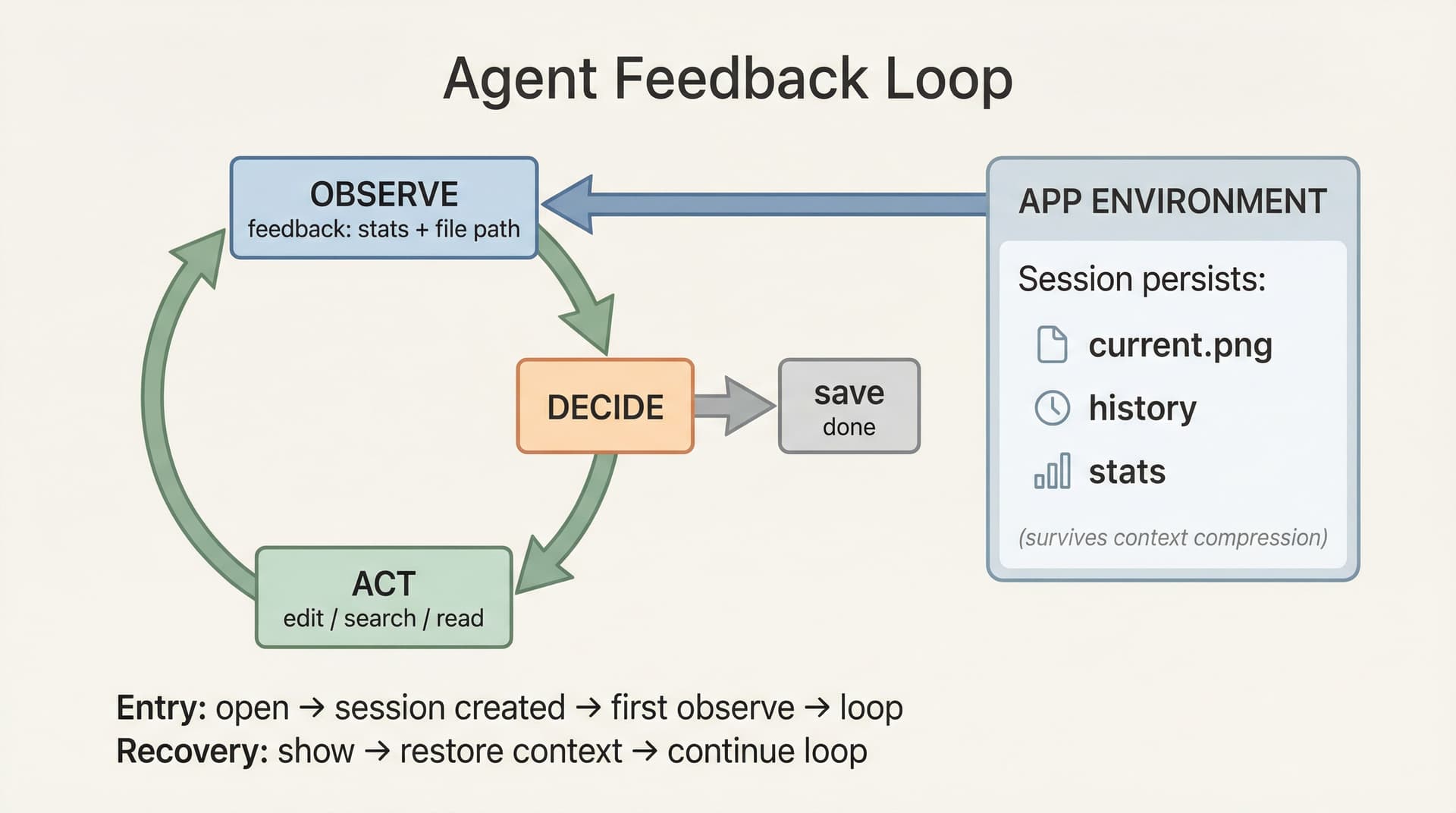
- Most tools are stateless and their results lack structured feedback—they just dump raw data into the context without providing rich environmental information about the current state. When context gets compressed, tool state and progress are lost.
All three points lead to one direction: agent systems need to be treated as serious engineering problems. They need proper environments with stateful applications, structured feedback, and systematic state management—not just clever prompts.
Today I'm open-sourcing the demo of Agentic Apps, which I believe will pave the way for the future of autonomous agents. Building based on engineering, not experience, is how we create environments that let agents verify their work, preserve state, and operate autonomously.
The structure of An App
In this case, I'd like to show you a demo of how to build apps: the Image App that powers image manipulation abilities. Agents already know a lot about describing images, but are limited in their ability to manipulate them directly. This Image App lets us give agents these new abilities.
The Entry Point
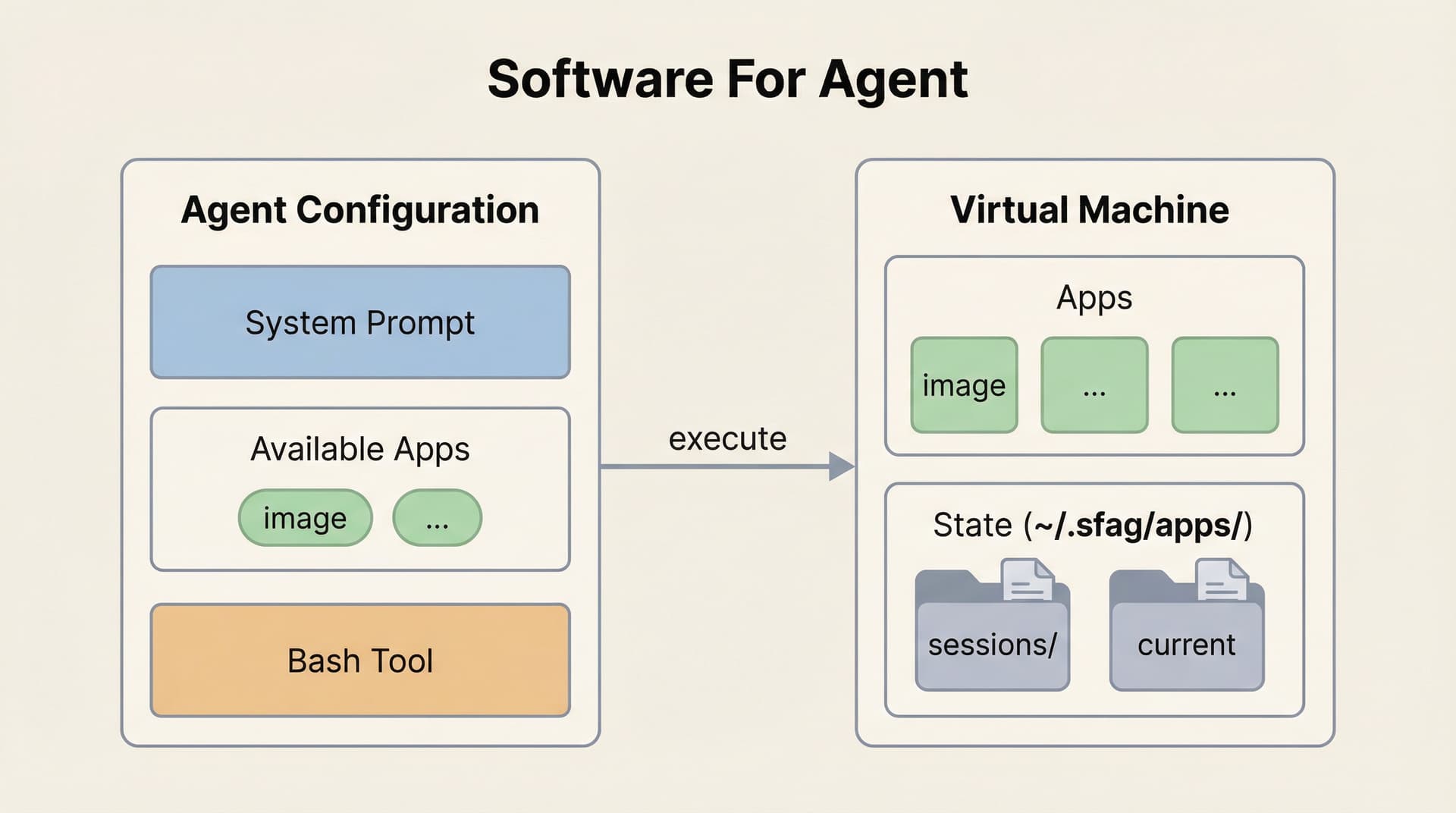
At its simplest, an app is a CLI tool that agents can invoke via Bash. The agent only needs to know that the app exists via system prompt:
You have access to Apps via Bash. Apps extend your capabilities.

Available Apps:
- image: Image processing (open, edit, generate, analyze)
- (more apps...)

All apps follow the same pattern:
- <app> open <path>    Start working with a file
- <app> --help         See all commands

When a task involves files these apps can handle, use them proactively.
By doing this, agent will have a more clear thoughts about what's the environment it actually lives in and what kind of capability it has with only few words.
The First Contact
When the agent needs to process an image, it invokes:
image open /path/to/photo.pngThe output of this command is the next level of detail. It tells the agent: the current state of the image (Stats), what operations are available (Commands), and how to learn more (Search/Read).
✓ Opened photo
Output: ~/.sfag/apps/image/sessions/photo/current.png

Stats:
  size: 1920x1080
  brightness: 45%
  contrast: 52 (std)

Available commands:

Edit (geometry):
image edit --resize <width>       Resize (maintains aspect ratio)
image edit --crop <w>x<h>         Crop from center
image edit --rotate <deg>         Rotate (90, 180, 270)
image edit --sharpen              Sharpen image

Edit (color - L1 basic):
image edit --brightness <n>       Adjust brightness (-100 to 100)
image edit --contrast <n>         Adjust contrast (-100 to 100)
image edit --saturation <n>       Adjust saturation (-100 to 100)

Edit (color - L2 advanced):
image edit --sigmoidal <c>,<m>    S-curve contrast (e.g. 5,50%)
image edit --levels <b>,<w>       Levels adjustment (e.g. 10%,90%)

Edit (AI):
image edit "<prompt>"             Edit with AI (e.g. "remove background")

Session:
image show                        Show current image info
image analyze                     Detailed stats (use --verbose for full)
image history                     Show edit history
image undo                        Undo last edit
image save -o <file>              Save to file

Learn more:
image search "<topic>"            Search guides (e.g. "portrait")
image read <name>                 View full guide content
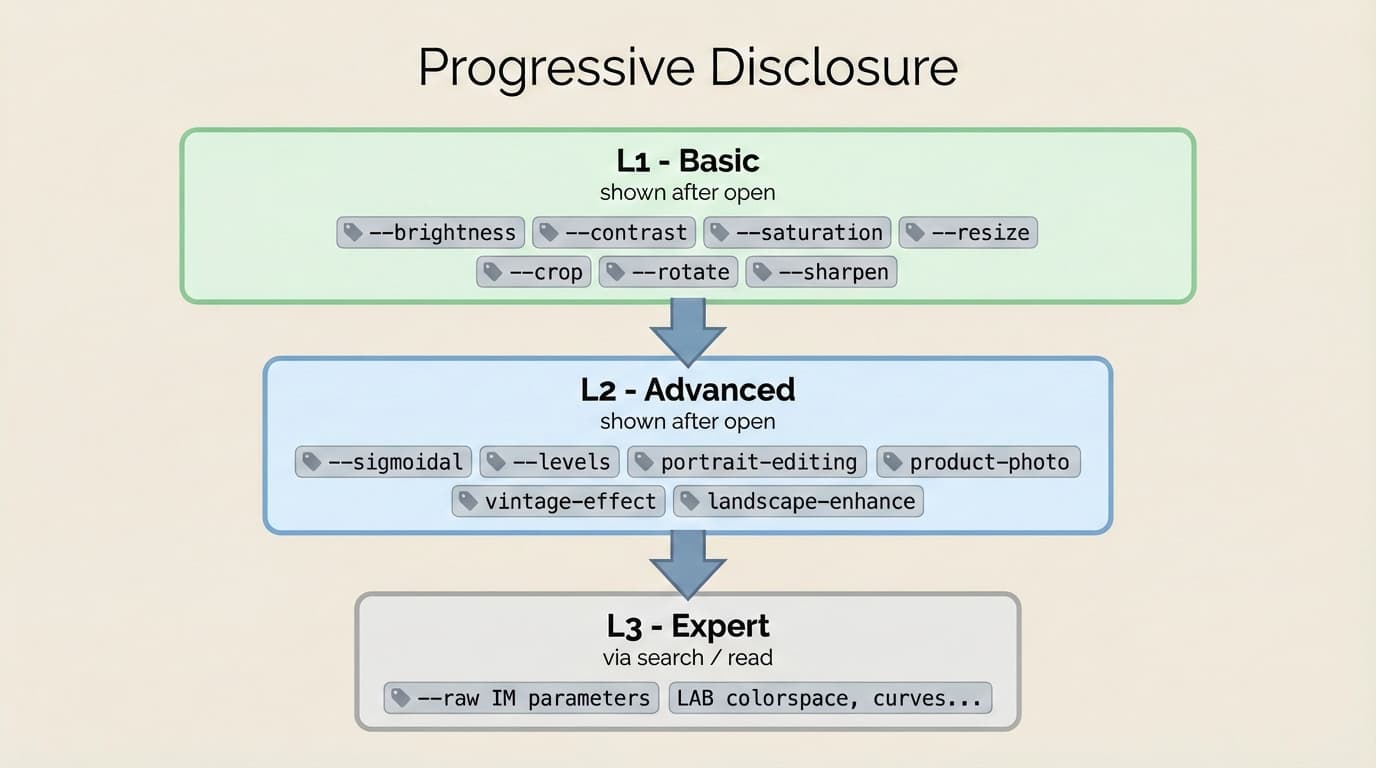
Commands are grouped by function and complexity. Agent can start with L1 basics, use L2 for finer control when needed. The most advanced option (L3: --raw for direct ImageMagick commands) is documented in the guides, accessible via image search and image read.
Built-in Skills
As both apps and tasks grow in complexity, the app will have some best practices and detailed usage instruction for how to become an expert in the app. The Image App bundles a searchable knowledge base as example:
image search "portrait"

Found 1 guide for "portrait":
  portrait-editing
    How to enhance portrait photos while maintaining natural skin tones.

To view full guide:
  image read portrait-editing
image read portrait-editing
# Portrait Editing
## Example Commands
### Basic (L1)
image edit --brightness 15 --contrast -10 --saturation 5
### Advanced (L2)
image edit --sigmoidal 3,50% --levels 5%,95%
### Pro (L3) - ImageMagick Direct
image edit --raw "-colorspace LAB -channel 0 -level 5%,95% +channel -colorspace sRGB"The guides contain executable examples that agents can copy and run directly. When facing unfamiliar scenarios, agents search the skill docs, find relevant techniques, and apply them immediately.
Progressive Disclosure
Progressive disclosure is the core design principle that makes Apps flexible and scalable:
┌───────┬───────────────┬─────────────────────────────────────────────────────┐
│ Level │     When      │                       Content                       │
├───────┼───────────────┼─────────────────────────────────────────────────────┤
│ L0    │ System prompt │ App name + one-line description                     │
├───────┼───────────────┼─────────────────────────────────────────────────────┤
│ L1    │ image open    │ Basic commands + Stats                              │
├───────┼───────────────┼─────────────────────────────────────────────────────┤
│ L2    │ image open    │ Advanced parameters (visible but requires learning) │
├───────┼───────────────┼─────────────────────────────────────────────────────┤
│ L3    │ image read    │ Pro techniques, raw commands, domain knowledge      │
└───────┴───────────────┴─────────────────────────────────────────────────────┘
Like a well-organized manual that starts with a table of contents, then specific chapters, and finally a detailed appendix, apps let agents load information only as needed.
Apps and the Context Window
Traditional skills and tool calls are stateless—they execute and return results, but don't remember what happened before. This causes two problems:
- Context discontinuity: Agent loses track of intermediate states during a multi-step task
- Post-compression confusion: After context compression, Agent doesn't know what was done or where to continue
Apps solve this by persisting state externally:
~/.sfag/apps/image/sessions/{name}/
├── session.json   # Operation history
├── 0.png          # Original (for reset)
├── prev.png       # Previous step (for undo)
└── current.png    # Current result
After context compression, the agent can recover by running image show and image history. The app remembers what the agent forgot and keeps the context window fresh.
Implementation
Image App uses different tools for different tasks:
┌─────────────────────────────────┬─────────────┬────────────────────────┐
│              Task               │    Tool     │          Why           │
├─────────────────────────────────┼─────────────┼────────────────────────┤
│ Geometry (resize, crop, rotate) │ Sharp       │ Fast                   │
├─────────────────────────────────┼─────────────┼────────────────────────┤
│ Color adjustment                │ ImageMagick │ Precise                │
├─────────────────────────────────┼─────────────┼────────────────────────┤
│ AI editing                      │ Gemini API  │ Semantic understanding │
├─────────────────────────────────┼─────────────┼────────────────────────┤
│ Document search                 │ Lunr.js     │ Lightweight            │
└─────────────────────────────────┴─────────────┴────────────────────────┘
The agent doesn't need to know these implementation details. It simply runs image edit --brightness 20 --sigmoidal 5,50% and the app internally routes to the appropriate tool.
Output Protocol
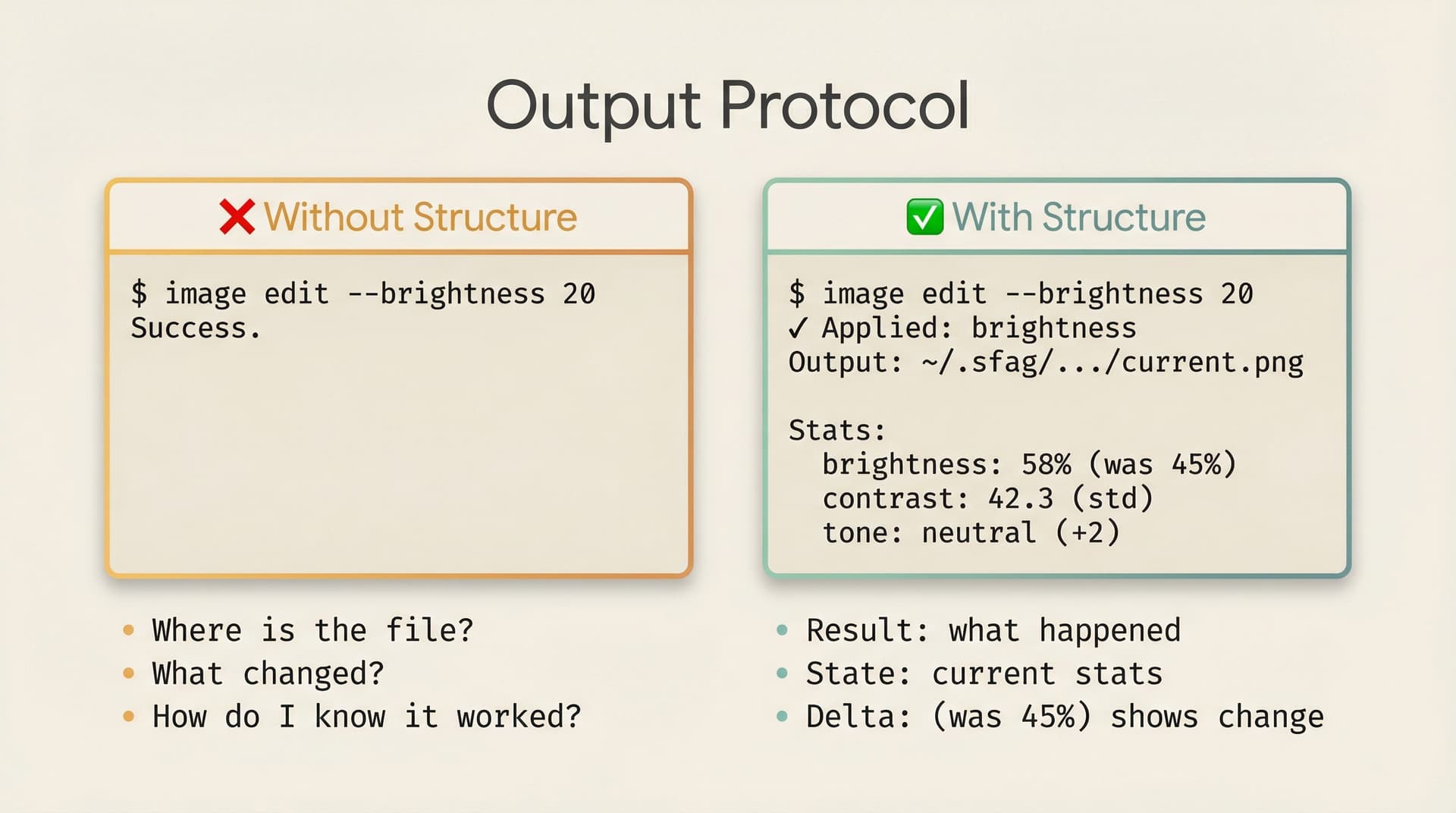
Every output is designed to give agents complete information for their next decision.
Success outputs include three parts: result, state, and next steps. When an agent opens an image, it receives the output file path, stats like brightness and contrast, and a list of available commands. After an edit, the output shows how stats changed— "brightness: 58% (was 45%)"—letting the agent judge whether the operation achieved the desired effect.
Error outputs tell agents not just what went wrong, but how to fix it. Instead of a generic "invalid parameter", the app responds with the valid range and an example: "Value must be between -100 and 100. Example: image edit --brightness 20".
Warnings protect against destructive actions. Before resetting to the original image, the app warns: "Next undo will reset to original image. All edits will be lost. Run again to confirm."
Info messages explain automatic actions. When the app auto-resizes a large image for API compatibility, it reports: "Resized to 2048x1536 (12.5MB) for API compatibility".
Developing and Evaluating Apps
Building agentic apps requires a different mindset. Your design must center around the agent and its bash tool—ask yourself how every piece of feedback adapts to agent input.
- Start with existing software, not from scratch. For companies with mature products, consider how to wrap existing functionality as a base API layer, then add agent-friendly semantic interfaces on top.
- Build incrementally, test with agents. After each feature, let an agent use it. Not a unit test—an actual multi-turn session where the agent decides what to do. If it misuses a command, your help text is unclear. If it repeats the same operation, your output didn't confirm success.
- Iterate from traces. Watch agent traces to find recurring mistakes. When you spot a pattern, you have two options: internalize the fix into your docs so agents learn the right approach upfront, or redesign your input parameters so the mistake becomes impossible.
The Future of Apps
We believe that by building Apps, we are establishing rigorous engineering standards for agent systems—enabling agents to work continuously and produce genuinely valuable outputs, not slop or toys.
Looking further ahead, we hope the community and companies like Anthropic and OpenAI will integrate Apps into their frameworks. More importantly, we need developers and companies with domain expertise to contribute their own Agentic Apps. Adobe could build apps for Photoshop, Vercel for Next.js, accounting firms for financial analysis—those with specialized knowledge in their fields are best positioned to create the verified feedback mechanisms their domains need.
Only by continuously providing agents with high-quality, structured environments can we avoid the "garbage in, garbage out" trap. I look forward to collaborating with everyone to build this future.
Acknowledgement
Written by Yang Leo Li. I hope from this day on we can build things in a logical way. The agentic app has a long way to go—we hope everyone of you can join us and build something which agents can perform well.
All the images in the blog are generated by the demo app.